Shopify apps for the workflow no plugin covers.
Embedded in the Shopify admin or running alongside it — private apps for a single merchant, public apps for the App Store. We've built the multi-store product, pricing, and inventory tooling that off-the-shelf apps couldn't.

You're probably here because…
These are the situations teams are usually in when they come to us about shopify apps. If more than one lands, we should talk.
- You're paying for four apps that each half-solve the same problem.
- Someone on the ops team re-keys the same data into Shopify every morning.
- You need admin tooling merchants don't have to leave Shopify to use.
- You have an app idea and want it in the App Store properly.
- You need checkout or storefront behaviour Shopify doesn't ship.
The work, spelled out
No mystery line items. This is what we deliver and what you get to keep.
Embedded admin apps
Tooling that lives inside the Shopify admin and looks like it belongs there, so staff never learn a second system.
Standalone Shopify services
Jobs, syncs, and dashboards running alongside Shopify when the work doesn't belong inside the admin.
Private single-merchant apps
Built for one business and one workflow — no App Store review, no compromises for other merchants.
Public App Store apps
Billing, onboarding, and multi-tenant install flows, through submission and into the listing.
Storefront & checkout extensions
Shopify Functions and extensions for discounts, validation, and delivery logic the platform doesn't cover.
Multi-store product & inventory sync
Products, pricing, and stock kept consistent across several storefronts without anyone maintaining a spreadsheet.
How this looks in practice
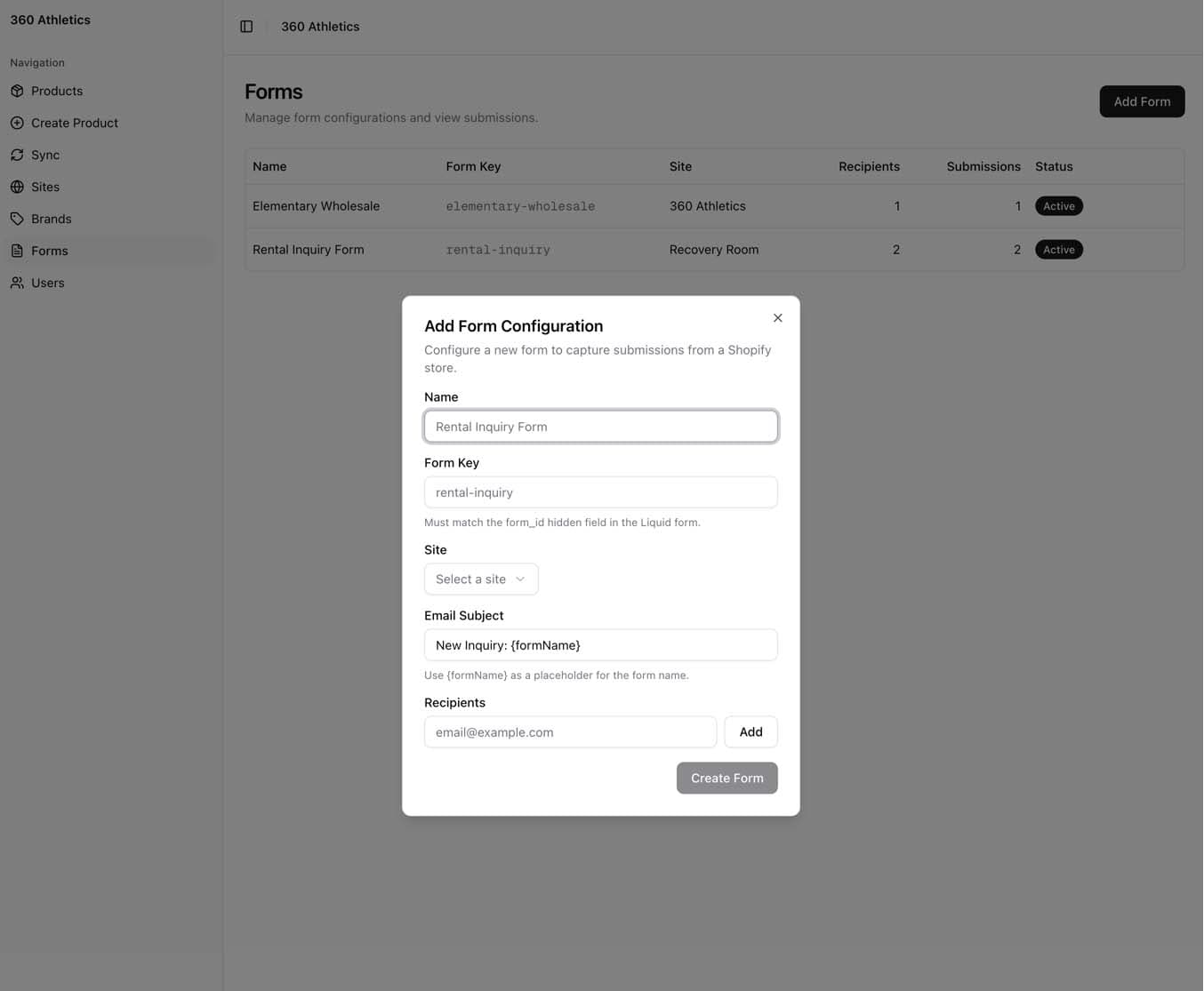
Bulk product creation, where the team already works
360 Athletics runs several Shopify stores from one catalogue. We built admin tooling with custom forms for creating and updating products in bulk — so a product launch is one operation across every storefront instead of the same work repeated store by store.
- Custom forms shaped to their catalogue, not a generic importer
- Bulk create and update across multiple storefronts
- Pricing and inventory kept consistent by default
- Built into the admin the team already uses daily
Two very different projects
A private app is built for one merchant: your data model, your edge cases, no review process. A public app has to work for merchants you'll never meet — multi-tenant data, billing, onboarding, support, and Shopify's review standards. Both are worth doing; they're just not the same project, and we scope them differently.
- Private: fastest path to solving your workflow
- Public: multi-tenant, billed, and reviewed
- App Store submission handled end to end
- Kept current as Shopify deprecates and replaces APIs
What we do differently here
The choices that decide whether this kind of work holds up a year later.
- 1
Start from the daily task
We watch the actual workflow before designing anything. The app's job is to delete steps, not add a screen.
- 2
Build embedded, so it feels native
Inside the admin, matching Shopify's own patterns — staff shouldn't be able to tell where Shopify ends and we begin.
- 3
Respect the API from day one
Rate limits, webhooks, and retries designed in at the start. Bolted on later, they're the reason apps quietly break.
- 4
Ship behind a real install flow
Proper OAuth, scopes, and billing — even for a private app, so it installs, updates, and uninstalls cleanly.
What we build it with
Every tool here earned its place. The point isn't the logos — it's the reasoning behind them.
 Shopify
The platform the app extends — its data model and conventions shape everything we build.
The Admin API is where the real work happens: products, inventory, orders, and pricing at scale.
Custom discount, delivery, and validation logic running inside Shopify's own checkout.
 Next.js
One framework serving the embedded admin UI and the background jobs behind it.
 TypeScript
Shopify's API surface is large and changes often — types make deprecations a build error, not an outage.
 Prisma
App state and sync history in a typed data layer, which matters more once an app is multi-tenant.
 PostgreSQL
Reliable storage for job history and per-merchant configuration.
Work we've shipped
The same capability, already delivered for someone else.
360 Athletics Automations Dashboard
We built 360 Athletics an automations dashboard that runs every Shopify store from one place. Syncing products, pricing, and inventory, and bridges their legacy Adagio ERP with automated EDI order delivery.
360 Athletics
A distributor of fitness equipment, sporting goods, and institutional products with a custom Shopify storefront selling direct to consumers.
Three ways we take on the work
Which one fits depends on the project — we'll recommend a shape after a discovery conversation, not before.
Project-based
A defined scope, an agreed timeline, and a fixed quote. We scope it after discovery, so the number means something.
Best forA private app with a known workflow.
Ongoing retainer
A recurring block of our time each month for continuous work — improvements, support, and whatever the roadmap needs next.
Best forA public app that needs maintaining against Shopify's release cycle.
Time & materials
Billed for the time the work actually takes. Best when the scope will genuinely move as we learn.
Best forExploratory app work that's still finding its shape.
Shopify Apps, specifically
The questions teams ask us most about this kind of work.
The rest of what we do
Most projects touch more than one of these. We cover the whole build.
Need Shopify to do something it doesn't?
Describe the workflow — we'll tell you whether it's an app, an extension, or a script.